
目录
MySQL
MySQL安装
MySQL的安装可以参考:
http://xinzhi.wenda.so.com/a/1523251515616401
https://www.csdn.net/gather_2a/MtTaEg5sNzU1MC1ibG9n.html
MySQL图形化界面navicat安装:
https://blog.csdn.net/pdcfighting/article/details/81669537
一、基本命令
1、启动服务
- 说明:以管理员身份运行cmd
- 格式: net start 服务名称
- 示例: net start mysq157
2、停止服务
- 说明:以管理员身份运行cmd
- 格式: netstop服务名称
- 示例: net stop mysq157
3、连接数据
- 格式: mysq1 -u用户名-p
- 示例: mysq1 -u root -p
- 输入密码(安装时设置的)
4、退出登录(断开连接)
- quit或exit
5、查看版本(连接后可以执行)
- 示例: select version( );
6、显示当前时间(连接后可以执行)
- 示例: select now();
7、远程连接
- 格式: mysq1 -h ip地址 -u 用户名 -p 输入对方mysq1密码
二、数据库操作
1、创建数据库
- 格式: create database 数据庠名charset=utf8;
- 示例: create database sunck charset=utf8;
2、删除数据库
- 格式: drop database 数据庠名;
- 示例: drop database sunck ;
3、切换数据库
- 格式:use数据库名;
- 示例: use sunck ;
4、查看当前选择的数据库
- select . database( ) ;
三、表操作
1、查看当前数据库中所有表
- show tables ;
2、创建表
- 格式:create table表名(列及类型);
- 说明:auto_ increment表明自增长 primary key主键 not null表示不为空
- 示例: create table student( id int auto_ increment primary key,name varchar(20) not null);
3、删除表
- 格式: drop table表名;
- 示例: drop table student ;
4、查看表结构
- 格式:desc 表名;
- 示例:desc student;
5、查看建表语句
- 格式: show create table表名;
- 示例: show create table student;
6、重命名表名
- 格式: rename table 原表名 to 新表名;
- 示例: reanme table car to newcar;
7、修改表
- 格式: alter table 表名 add | change | drop 列名 类型;
- 示例:alter table newcar add isDelete bit default 0
四、数据操作
1、增
a、全列插入
- 格式: insert into表名values(...)
- 说明:主键列是自动增长,但是在全列插入时需要占位,通常使用日,插入成功以后以实际数据为准
- 示例: insert into student values(日, "tom" ,19,1, "北京",0)
b、缺省插入
- 格式: insert into 表名(列1,列2, values(値1, 値2,......);
- 示例: insert into student (name, age, address) values("1ilei" ,19,"_上海");
c、同时插入多条数据
- 格式: insert into 表名values(..:),(..·),...
- 示例: insert into student values(0, "hanmeimei" ,18,0, "北京",0)
2、删
- 格式: delete from 表名 where 条件;
- 示例: delete from student where id=4 ;
- 注意:没有条件是全部删除,慎用
3、改
- 格式: update 表名set 列1=值1,列2=值..... where 条件;
- 示例: update student set age=16 where id=7 ;
- 注意:没有条件是全部列都修改,慎用
4、查
- 说明:查询表中的全部数据
- 格式: select * from表名;
- 示例: select * from . student ;
五、查
1、基本语法
- 格式:select * from表名
- 说明:
- a、from关键字后面是表名,表示数据来源于这张表
- b、select后面写表中的列名,如果是*表示在结果集中显示表中的所有列
- c、在select之后的列名部分,可以使用as 来取别名,这个别名显示在结果集中
- d、如果要查询多个列,之间使用逗号分隔
-
示例:
<p>      select * from student ;</p>

<p>      select  name ,  age from student ;</p>

<p>      select name as a, age from student;</p>
</li>
2、消除重复行
- 在select 后面列前面使用distinct可以消除重复的行
- 示例:
- select gender from student ;
- select distinct gender from student ;
3、条件查询
- a、语法
- select * from表名where 条件
- b、比较运算符
- 等于 =
- 大于 >
- 小于 <
大于等于 >= - 小于等于 <=
不等于 !=或<>
需求:查询id值大于8的所有数据
示例: select from student where id>8; - C、逻辑运算符
- and 并且
- or 或者
- not 非
- d、模糊查询
- like
- % 表示任意多个任意字符
- _ 表示一个任意字符
- e、范围查询
- in 表示在一个非连续的范围内
- between...and... 表示在一个连续的范围内
- f、空判断
- 注意:null与""是不同的
-
判断空: is null
判断非空: is not nu11<p>需求:查询没有地址的同学<br /> 示例: select * from student where address is null ;<br /> 需求: 查询有地址的同学<br /> 示例: select * from student where address is not null ;</p> </li> <li>g、优先级</li> <li>小括号,not比较运算符,逻辑运算符<br /> and比or优先级高,如果同时出现并希望先选or,需要结合()来使用</li>
4、聚合
- 为了快速等到统计数据,提供了5个聚合函数
- a、count(*) 表示计算总行数,括号中可以写*和列名
- b、max(列) 表示求此列的最大值
- c、min(列) 表示求此列的最小值
- d、sum( 列) 表示求此列的和
- e、avg(列) 表示求此列的平均值
- 需求:查询学生总数
- 示例: select count(* ) from student ;
5、分组
- 按照字段分组,表示此字段相同的数据会被放到一个集合中。
- 分组后,只能查询出相同的数据列,对于有差异的数据列无法显示在结果集中
- 可以对分组后的数据进行统计,做聚合运算
- 语法: select 列1,列2,聚..... from 表名 group by 列1,列2,列3...
-
where与having的区别:
where是对from后面指定的表进行筛选,属于对原始数据的筛选
having是对groupby的结果进行筛选
6、排序
语法: select * from 表名 order by 列1 asc desc,列2 asc l desc
说明:
- a、将数据按照列1进行排序,如果某些列1的值相同,则按照列2进行排序
- b、默认按照从小到大的顺序排序
- c、asc降序
- d、desc升序
7、分页
语法: select* from 表名 limit start , count ;
说明: start 索引从0开始
示例:
- select * from student limit 0,3
- select * from student limit 3,3
- select * from student where gender=1 limit 0,3
关联查询:
select students. name, class.name from class inner join students on class. id=students. classid;
select students. name,class.name from class left join students on class. id=students. classid;
分类:
1、表A inner join 表B:
表A与表B匹配的行会出现在结果集中
2、表A left join 表B:
表A与表B匹配的行会出现在结果集中,外加表A中独有的数据,未对应的数据使用null填充
3、表A right join 表B:
表A与表B匹配的行会出现在结果集中,外加表A中独有的数据,未对应的数据使用null填充
python连接MySQL数据库
python要连接MySQL数据库,需要安装PyMySql包
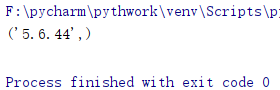
例子:使用python代码获取MySQL的版本号

import pymysql

#连接数据库
#参数1:mysql服务所在的主机IP
#参数2:用户名
#参数3:密码
#参数4:要连接的数据库名
db = pymysql.connect('localhost','root','passwd','class')

#创建一个cursor对象
cursor = db.cursor()
#sql语句打印版本号
sql = 'select version()'
#执行sql语句
cursor.execute(sql)
#获取返回的信息
data = cursor.fetchone()
print(data)
#断开连接
cursor.close()
db.close()
运行结果:
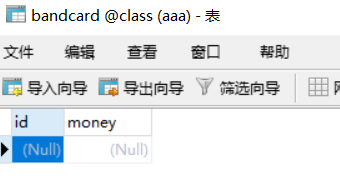
例子:给数据库创建一个新表

import pymysql

db = pymysql.connect('localhost','root','passwd','class')
cursor = db.cursor()

#检测表是否存在,如果存在则删除
cursor.execute('drop table if exists bandcard')
#建表
sql = 'create table bandcard(id int auto_increment primary key,money int not null)'
cursor.execute(sql)

cursor.close()
db.close()
运行结果:

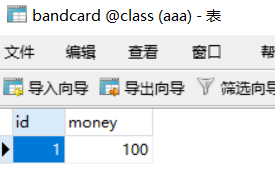
例子:向表格中插入数据
import pymysql

db = pymysql.connect('localhost','root','passwd','class')
cursor = db.cursor()

sql = 'insert into bandcard values(0,100)'
try:
    cursor.execute(sql)
    db.commit()
except:
    #如果提交失败,回到上一次的数据
    db.rollback()
cursor.close()
db.close()
运行结果:
fetchone():
功能:获取下一个查询结果集,结果集是一个对象
fetchall():
功能:接收全部的返回的行
rowcount:是一个只读属性,返回execute()方法影响的行数
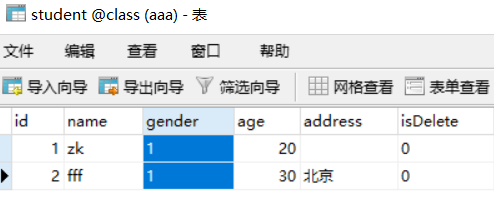
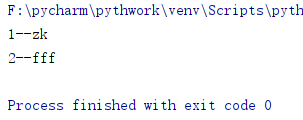
例子:查询表中数据
import pymysql

db = pymysql.connect('localhost','root','123456ddd','class')
cursor = db.cursor()

sql = 'select * from student'
try:
    cursor.execute(sql)
    reslist = cursor.fetchall()
    for row in reslist:
        print('%d--%s' %(row[0],row[1]))
except:
    print('失败')
    #如果提交失败,回到上一次的数据
    db.rollback()
cursor.close()
db.close()
运行结果:
一起学习,一起进步 -.- ,如有错误,可以发评论

